
6min read
Car detailing appointment reminders: what to send and how to automate them
Copy four car detailing SMS examples for drop-offs, mobile visits, preparation, and cancellations. Learn to send reminders from Google Calendar.
Read full articleAlready use Google Calendar? Connect it. Still using pen and paper? Start fresh. Set up automatic SMS reminders in under a minute - without a complicated booking system.
Up to 60 free SMS · Most users send their first reminder in under a minute · No credit card required
Etisia is an app that automatically sends SMS reminders for appointments in Google Calendar. Clients book as usual, and you add the appointment to your calendar. Etisia sends a reminder at your chosen time, without manual texting and with less worry about forgotten appointments.
Once, in under a minute. Your appointments stay in your own calendar.
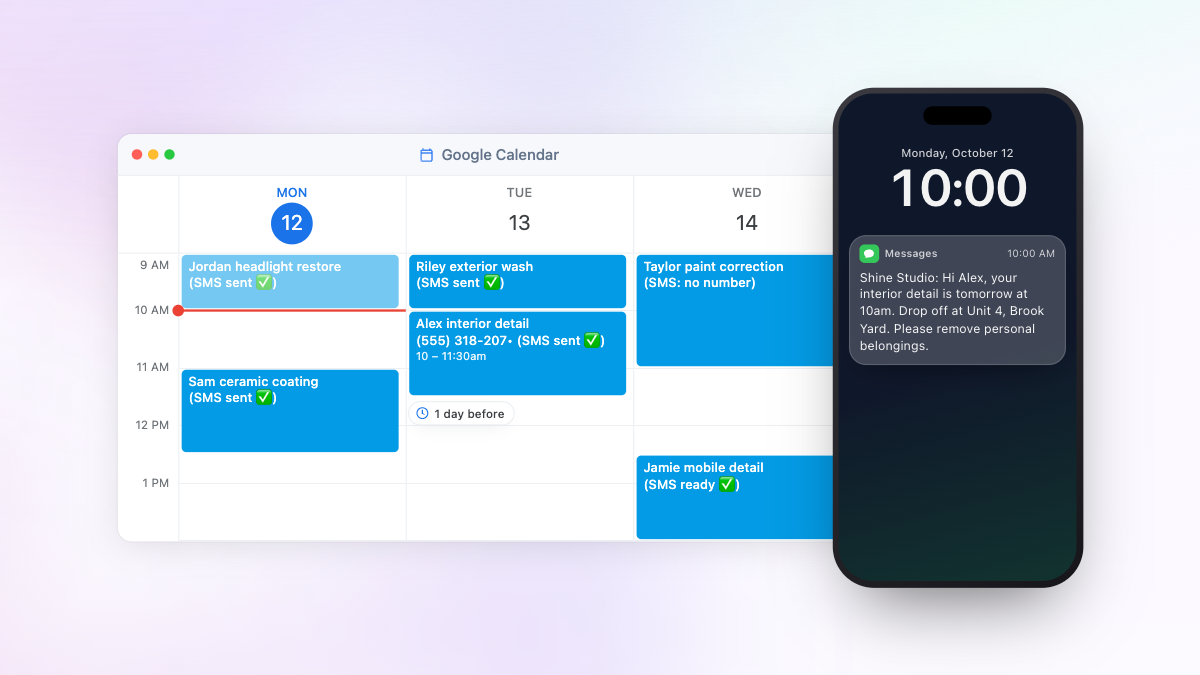
The way you already do. The number alone is enough for the text to go out. Once Etisia finds it, it adds (SMS ready ✅) to the title.
At the reminder time you chose, for example 1 day before. Once the reminder has gone out, the title says (SMS sent ✅).
Keep your current booking process and send SMS reminders for Google Calendar automatically with Etisia.
Your average appointment
That's
walking out your door every year.
Per month
$0
Per week
$0
Wasted hours/year
0 hrs
Etisia brings them back.
Assumes half your no-shows come down to forgetting rather than a deliberate skip.
Annual savings
$0
Appointments recovered
0
Hours saved
0 hrs
Up to 60 free SMS
SMS reminders straight from Google Calendar, with an optional cancellation link, AI contact matching and group messages built in.
Create an appointment in Google Calendar. Your client gets SMS reminders automatically - no extra steps.
Quiet hours are on by default: a reminder that would land between 10 pm and 7 am goes out at about 8 pm instead. Times follow the appointment’s time zone.
Turn on the cancellation link and clients can cancel straight from the SMS. The calendar event is removed and you get an email - no phone tag needed.
Etisia reads the event title, finds the matching contact, and gets the phone number - even if the name isn't written perfectly.
Pick a day in a calendar to text everyone booked, or add numbers by hand. Each client gets their own SMS, each number only once, and opted-out clients are skipped.
You do not need a booking system, and your clients do not need to change how they book.
Connect it and keep working exactly as you do today. Etisia handles the SMS reminders in the background.
No migration. No new workflow.
Start with one simple Google Calendar. Clients can still book by phone, message, or in person-you add the appointment once, and Etisia handles the reminder.
A simple first step into digital scheduling.
Up to 60 free SMS
For businesses that book time with people. Find your profession and see how SMS reminders fit your day. Unlike a booking system, there are no services, staff or business hours to set up: add the appointment with the client's phone number and Etisia sends the reminder.
Swipe or use the arrow keys to browse professions. Scrolling pauses while you explore the cards.


Keep Google Calendar as the main calendar your team works from. Etisia adds automatic reminders and an optional cancellation link, without a new booking system or workflow builder.
Every plan includes:
$12/month
Billed yearly · $144 (tax excl)
For one person and one calendar. 100 SMS a month covers about 100 appointments with one reminder each.
Up to 60 free SMS
$22/month
Billed yearly · $264 (tax excl)
For up to three calendars, such as three staff members or rooms. 250 SMS a month.
$82/month
Billed yearly · $984 (tax excl)
For larger teams: unlimited Google Calendars, staff accounts and 1,000 SMS a month at a fixed price. Need more SMS than that? Talk to us.

Actionable tips, data, and templates that help appointment-based businesses keep calendars full without adding new software.
Copy four car detailing SMS examples for drop-offs, mobile visits, preparation, and cancellations. Learn to send reminders from Google Calendar.
Read full article
Keep Google’s booking page and confirmation emails. Etisia adds automatic SMS reminders and an optional cancellation link without changing how clients book.
Read full article
Free email reminders are useful, but clients can still miss them. See when adding an SMS reminder makes sense without replacing Google Calendar.
Read full articleSee it in action
How Etisia works with your Google Calendar, what your clients receive and what it costs.
Etisia sends automatic SMS appointment reminders from your Google Calendar. After a one-time setup, you keep booking in Google Calendar as usual, with the client’s mobile number in the appointment. You don’t open Etisia each time you book.
Your clients get an ordinary text message: no app and no account. Etisia isn’t a booking system, so clients keep booking with you the way they do now.
Probably not, if your booking system already texts your clients. Etisia is for businesses that keep their appointments in Google Calendar, and for those still using pen and paper.
Still using pen and paper? Etisia is an easy first step. Keep your appointments in a free Google Calendar and write the client’s full name in each one, plus their mobile number the first time. That’s all Etisia needs, and your calendar gets tidier for it: every appointment shows who’s coming. The reminders go out in the background, so there’s nothing to open or send each day.
If your booking tool copies appointments into Google Calendar with the client’s mobile number in the event title, description or location, Etisia can send reminders from those events. Switch off the tool’s own text reminders, so clients don’t get two.
There is no direct connection to booking systems: Etisia only reads Google Calendar.
We set up your reminders for you on every plan. You can also set things up yourself:
Sign up with Google, connect Google Calendar (tick both calendar permissions), pick your appointment calendar, and choose Default settings or set your own times and wording. Tick the box to say you have your clients’ permission, and you’re done.
Default settings send one reminder the day before, with recommended wording that names your business.
Then use Add test appointment: Etisia adds an appointment with your name and number to the calendar and texts you its reminder straight away, free.
Etisia works with free personal Google accounts and Google Workspace. You can connect calendars that account owns or can edit (“Make changes to events”). Read-only, holiday and subscribed calendars aren’t listed. If a Workspace admin blocks outside apps, use a personal account.
Only Google Calendar is supported: no Outlook or Apple Calendar.
Appointments in a different Google account? Disconnect Google in your profile and connect the other one. You don’t need a new Etisia account.
Type the client’s name and mobile number in the appointment title, for example “Sarah Jones (201) 555-0123 Haircut”. Etisia also looks in the description, the location and guests’ names.
You only type a number once: Etisia saves the client to your Contacts, so next time “Sarah Jones” is enough. A first name alone won’t match, and neither will two saved clients with the same name. You can also import contacts from your phone.
Two numbers in one event? Label the mobile one, for example “mobile: …”.
Etisia is available in 15 countries: the US, the UK, Australia, Ireland, Slovenia, Germany, Austria, Switzerland, Lithuania, Slovakia, Croatia, Spain, Poland, Portugal, and the Netherlands. The app and texts are available in English, Slovenian, German, Croatian, Spanish, Polish, European Portuguese, Dutch, Lithuanian and Slovak.
Reminders go to mobile numbers from your own country. For a client with a number from another Etisia country, write it with + and the country code: our team checks each appointment with such a number before its texts go out, so add these appointments in good time. Other countries can’t be texted, for example France or New Zealand.
Yes. Once a calendar is switched on, appointments already in it get their reminders automatically, with nothing to re-enter.
If a reminder’s time has already passed, it can still go a little late, and a day-before reminder still goes while the appointment is at least 12 hours away. Example: you finish setup at lunchtime. A client booked for 9 tomorrow morning gets the day-before reminder straight away; a client booked for 6 this evening doesn’t, but a 1-hour reminder would still go.
The booking message only goes to appointments added after you switch it on.
Yes. Etisia handles each repeat as its own appointment with its own reminders. Put the client’s number in the recurring event, and every visit in the series is covered.
To change just one visit, edit that occurrence rather than the whole series.
No. Reminders go only for appointments with a readable mobile number (or a saved client’s full name) in calendars you switch on. All-day events, out-of-office and focus-time blocks, invitations you declined and events without a title are skipped.
Etisia doesn’t judge whether an event is a client appointment, so a personal event with a number in it, such as your plumber’s, gets a reminder too. Keep private appointments in a calendar you don’t switch on.
You can pause a calendar or cancel one reminder in Etisia without deleting the appointment.
Yes. Etisia’s Starter plan covers one calendar, Pro three and Team as many as you need. Each calendar has its own reminder times and wording, so you can keep one per team member or service.
Team also adds staff accounts: you invite staff by email, they connect their own calendars and share the team’s SMS credits, and you can see and edit their calendars.
With the recommended wording, a US client gets: “Glow Studio: Hello, you have an appointment with us tomorrow, October 15, 2026 at 2:30 PM. Reply STOP to opt out.” Your business name and the STOP line are on every US text.
You can pick another template or write your own (up to 1,600 characters). Etisia fills in the date and time, and can add the appointment’s location. The client’s name isn’t included, which keeps texts discreet on a lock screen.
Each calendar has one wording; the preview shows the finished text before you save.
Every Etisia plan includes up to three sending times per calendar, for example the day before and two hours before. The booking message counts as one of the three.
Choose 15 minutes, 1, 2 or 6 hours, 1 or 2 days, 1 week, 10 days or 1 month before, or the morning of the appointment (about 8 am; for appointments before 10 am, about 8 pm the evening before).
Texts go out within about 15 minutes of the chosen time, quiet hours can move late-night ones, and each text uses SMS credits.
Yes, with the optional booking message. About two minutes after you add a new appointment with a start time, Etisia texts the client its date and time. The short wait gives you time to fix a typo. If the cancellation link is on, it’s included.
It only goes for appointments added after you switch it on, never for your existing calendar, and it can’t be scheduled for later, such as that evening. Quiet hours skip it at night.
Clients can’t confirm the appointment by replying to it.
No: Etisia’s quiet hours are on by default, so no reminder goes out between 10 pm and 7 am in the appointment’s time zone.
A reminder that would land in that window is brought forward to about 8 pm. Example: a 1-hour reminder for a 7 am appointment goes at about 8 pm the evening before.
A booking message due at night is skipped, not postponed, and a change notice waits until 7 am. You can switch quiet hours off for any calendar.
Yes. When you write your own wording in Etisia, the Time ± … button adds or subtracts hours and minutes from the appointment time, so the text can show a window or an earlier time.
Window: “Our technician will arrive tomorrow between 9:00 AM and 11:00 AM.” A two-hour offset turns the 9:00 AM start into 11:00 AM.
Come early: “Please arrive by 9:45 AM to fill out the forms.” Subtracting 15 minutes from a 10:00 AM start gives 9:45 AM. That time mustn’t have passed when the text arrives, so Etisia limits how far back you can go: up to 15 minutes with a 1-hour reminder, and not at all with a 15-minute or Smart Morning reminder. The preview shows the result before you save.
Yes. When you write your own wording in Etisia, add the Appointment location tag. Etisia copies the Location field of the Google Calendar event into the text (up to 120 characters), so each client gets the address of their own visit: handy for home visits or a second location.
Put the tag on its own line, and appointments without a location simply leave that line out. If you change the location in Google Calendar, reminders that haven’t gone yet use the new one.
For online sessions, paste the Zoom, Google Meet or Teams link into the event’s Location field. Etisia doesn’t add video links by itself.
Move the appointment in Google Calendar and every reminder that hasn’t gone yet moves with it, with the new date and time in the text. There’s nothing to redo.
Example: you move a Thursday 2 pm visit to Monday 10 am, so the day-before reminder now goes on Sunday at about 10 am. If the move makes a pending reminder too late (say Friday’s visit moves to later today), Etisia sends one change notice a few minutes after your last edit: that reminder with the new date and time, starting “Appointment change notice:”. Move the visit back before then and the notice isn’t sent.
If the client already got a text with the old time, a reminder or the booking message, Etisia sends them a change notice with the new date and time a few minutes after your last edit, also starting “Appointment change notice:”. Move the visit back to the time they were told and nothing goes out, and an appointment gets at most three change notices. Right before each reminder goes out, Etisia checks the appointment in Google Calendar again, so a deleted appointment gets nothing and an outdated time never goes out.
Yes, if you turn on the optional cancellation link. It’s off by default and available on every plan. Reminders and the booking message then include “Cancel at https://eti.is/aB3dE9.”
Your client opens the link, sees the appointment date, enters the mobile number the text went to and confirms. Etisia deletes the appointment from Google Calendar, stops its remaining reminders and emails you. The link only cancels: to move a visit, clients contact you.
If you delete an appointment yourself, its pending reminders stop.
In the US, texts come from Etisia’s US phone number. Every text starts with your business name, so clients know it’s you (“Glow Studio: Hello, …”), and ends with “Reply STOP to opt out.”
Sending from your own mobile number or under a custom sender name isn’t available in the US. To see exactly what clients get, use Add test appointment and check the text on your own phone.
Texts are one-way, with one exception: clients can reply STOP to opt out. Nobody reads other replies, there’s no inbox in Etisia, and a reply doesn’t confirm, cancel or move the appointment.
So clients can reach you, put your phone number in the message text. To let them cancel without calling, turn on the cancellation link.
Not in the US. Automatic review requests are only available to accounts in Etisia’s other countries, so US plans don’t include them.
Everything else works the same in the US: reminders, the booking message, the cancellation link and group messages.
Yes. Pick a day in one calendar to text everyone booked that day, for example about a closure or running late, and add other numbers by hand if you need to. Each client gets their own SMS, not a group chat.
Etisia skips clients who opted out and texts each number once. Every text uses SMS credits, and the send is refused if you don’t have enough for everyone. Group texts can only be about your appointments or your business: offers and discounts can’t be sent, and neither can texts aimed at new customers.
Etisia’s free trial gives you 21 days of Pro, with no credit card, including up to three calendars. Staff accounts and extra SMS packs need a paid plan.
You also earn up to 60 free SMS as you finish setup steps, such as connecting Google and sending your first reminder. It’s a one-time allowance, not monthly.
When the trial ends, nothing is charged and nothing renews: reminders stop until you choose a plan. Choose one earlier and you keep the free SMS you’ve earned.
Starter is $15 a month for one calendar and 100 SMS credits. Pro is $27 a month for three calendars and 250 credits. Team is $99 a month for unlimited calendars, staff accounts and 1,000 credits.
Paying yearly, Starter is $144 a year, about $12 a month, and yearly plans still get their credits every month. Prices exclude tax.
Every plan has up to three reminder times per calendar, your own wording, quiet hours, the cancellation link and group messages. Compare all plans.
In Etisia, one credit pays for one SMS of up to 160 characters. Longer texts are split into parts (segments) of one credit each, and emoji or some accented letters make each part shorter. The preview shows the count before you save.
US texts always include your business name and the STOP line, so with the cancellation link a reminder can take 2 credits.
100 credits cover about 100 appointments with one reminder, or about 50 with two. For around 120 texts a month, choose Pro, or add an extra 50-SMS pack to Starter when you need it.
Etisia stops sending and emails you, after warning you when credits run low. Your appointments stay in Google Calendar untouched.
On a paid plan, buy an extra pack of 50 SMS on the Subscription page, or switch on automatic top-up: it buys a pack when 10 or fewer credits are left, up to the 1–3 packs a month you allow.
Once credits are back, reminders still within their short catch-up window go out; older ones aren’t sent later. Plan credits reset each month and don’t roll over, while extra packs carry over.
Yes. The account owner changes plans in Etisia’s Subscription section; changes apply straight away and are prorated. You can’t move to a smaller plan while you use more calendars than it includes or have used more credits this month than it allows. Leaving Team removes staff accounts.
A cancellation takes effect at the end of the period you’ve paid for, and you can undo it until then.
You can request a refund within 14 days of a subscription start or renewal, no questions asked: email [email protected].
Look at the appointment in Google Calendar: Etisia adds “(SMS ready ✅)” to the title when a reminder is scheduled and “(SMS sent ✅)” once it has gone. You can switch these labels off.
Your SMS history in Etisia shows every text as Sent, Delivered, Not sent, Failed, Cancelled or Waiting, with a plain reason for anything not sent. Sent means handed to the mobile network; Delivered means the network reported delivery. Neither tells you whether your client read it or will come.
First, check that the appointment is in the Google account and calendar you connected. It’s the most common reason.
“(SMS missed ❌)” in the title means it was too late for your reminder time, usually after a short-notice booking, or the number isn’t a mobile. For short-notice bookings, add a closer reminder time or the booking message.
Other reasons: the client opted out, credits ran out, the calendar is paused or the Google connection expired (Etisia emails you to reconnect). SMS history shows the reason, and the help pages explain each one.
Yes, and your business is responsible for having it, not Etisia. During setup you tick a box to say you have your clients’ permission.
The simplest way: when a client books, tell them you’ll text a reminder, and keep reminders separate from promotions. In Etisia Contacts you can record how each client agreed, for example by phone booking, in person or from your own records, and add a note.
Every US text ends with “Reply STOP to opt out.”, so clients can reply STOP. If a client asks you in person or by phone, mark them as opted out in Etisia Contacts.
Clients marked as opted out get no further texts from your business. Opting out doesn’t cancel an appointment, so only change the booking if they ask.
Etisia reads only the calendars you set up and never changes times, descriptions or guests. You connect through Google’s own permission screen, which covers all your calendars, and Etisia never asks for your Google password.
It writes to your calendar only to add status labels, delete appointments clients cancel by link and add the setup test appointment. An AI service helps find client names in your events, and Etisia saves those clients (name and number) to your Contacts to send your texts.
Read our privacy policy. You can disconnect Google or delete your account at any time.
We set it up for you on every plan. Once you connect Google, we configure your calendars and reminder timing. Priority support is included too.
Use Etisia’s support chat on the website or in the app, email [email protected], or write to us on the contact page. The help pages walk through most setup questions step by step.
Tell us which calendar and appointment you’re checking and what you expected, and we can look at your setup with you. You never need to share your Google password.
Every forgotten appointment is an empty slot in your day and money you won't get back. Etisia texts your clients a reminder straight from your Google Calendar, so you don't have to text or call anyone the day before. You can set it up in under a minute.
21-day free trial · Up to 60 free SMS · No credit card