
Google Calendar SMS Reminders Discontinued: What Happened and What to Use Now

Google Calendar SMS reminders were discontinued on January 7, 2019. Google Calendar can still remind you with app, browser, desktop, and email notifications, but it no longer sends native SMS reminders. If you still need to text clients from Google Calendar, Etisia is the workaround: connect your calendar, let Etisia read appointment events, and send SMS reminders to the right person.

Official source

Google Calendar SMS reminders discontinued official

Google announced the removal in an official Google Workspace Updates post: Google Calendar SMS notifications to be removed January 7, 2019.

Google's current Calendar Help documentation describes reminders through phone, computer, browser, and email notifications, not native SMS reminders. See Google Calendar notification settings for the current notification options.

  • Official removal date: January 7, 2019.
  • What disappeared: native SMS notifications from Google Calendar.
  • What still exists: personal Google Calendar notifications by app, browser, desktop, and email.

Google Calendar SMS notifications discontinued 2019

Before January 2019 — Google Calendar had an SMS notification option. It was part of Google Calendar's own notification system — a reminder sent to you through your Google account settings, not a client-reminder workflow for appointment businesses.

January 7, 2019 — Google removed SMS notifications from Google Calendar. Google said that people who had been receiving SMS notifications would instead get in-app/browser/mobile notifications and email notifications.

Since 2019 — Google Calendar still has notifications, but the current supported notification types are delivered on your phone, in your web browser, or by email. Google also says notification settings are personal to your account and do not determine notifications for other people who have access to the calendar.
Can Google Calendar send text reminders?

No, Google Calendar cannot send native SMS or text reminders today. It can remind the calendar owner by app notification, browser or desktop notification, and email, but it does not text clients, patients, students, or customers.

That distinction matters: Google Calendar notifications are personal reminders for your own account. Client-facing SMS reminders need a connected reminder service that can read the appointment, find the client phone number, and send the message outside Google Calendar.

  • Email reminder: yes, for your own Google account.
  • Push, phone, browser, or desktop notification: yes, for your own Google account.
  • Native SMS reminder: no.
  • Client SMS reminder from Google Calendar: yes, with a tool like Etisia.

Compare SMS reminder services that integrate directly with Google Calendar

Compare SMS reminder services that integrate directly with Google Calendar
Service / path Google Calendar integration Best fit Tradeoff
Google Calendar native notifications Built into Calendar, but no native SMS channel Personal app, browser, desktop, and email reminders Does not text clients
Etisia Connects to Google Calendar and sends client SMS reminders from events Appointment businesses that want Google Calendar to stay the source of truth Focused on SMS reminder workflows rather than replacing your booking software
Zapier + Twilio Can connect Calendar triggers to SMS sending with custom setup Technical teams that want flexible automation More moving parts, plus template, opt-out, and reporting responsibility
Scheduling suites Often sync bookings back to Google Calendar Teams willing to move more scheduling into another platform May not cover manual calls, walk-ins, or every existing calendar event

For most Google Calendar-first appointment businesses, the practical replacement is a service that reads the calendar directly and sends SMS reminders without moving the team into a new scheduling system.

How to send text reminders from Google Calendar

Use Google Calendar for the appointment and Etisia for the SMS reminder layer. The setup below keeps the calendar workflow intact while adding client-facing texts.

Set it up in 30 seconds

Sign in with Google, connect your Google Calendar, and turn the reminder workflow on. The whole replacement path is meant to feel faster than the old Google SMS setup ever did.

The calendar stays the source of truth. Etisia adds the reminder layer on top in one quick setup.

Enter the phone number or use a contact

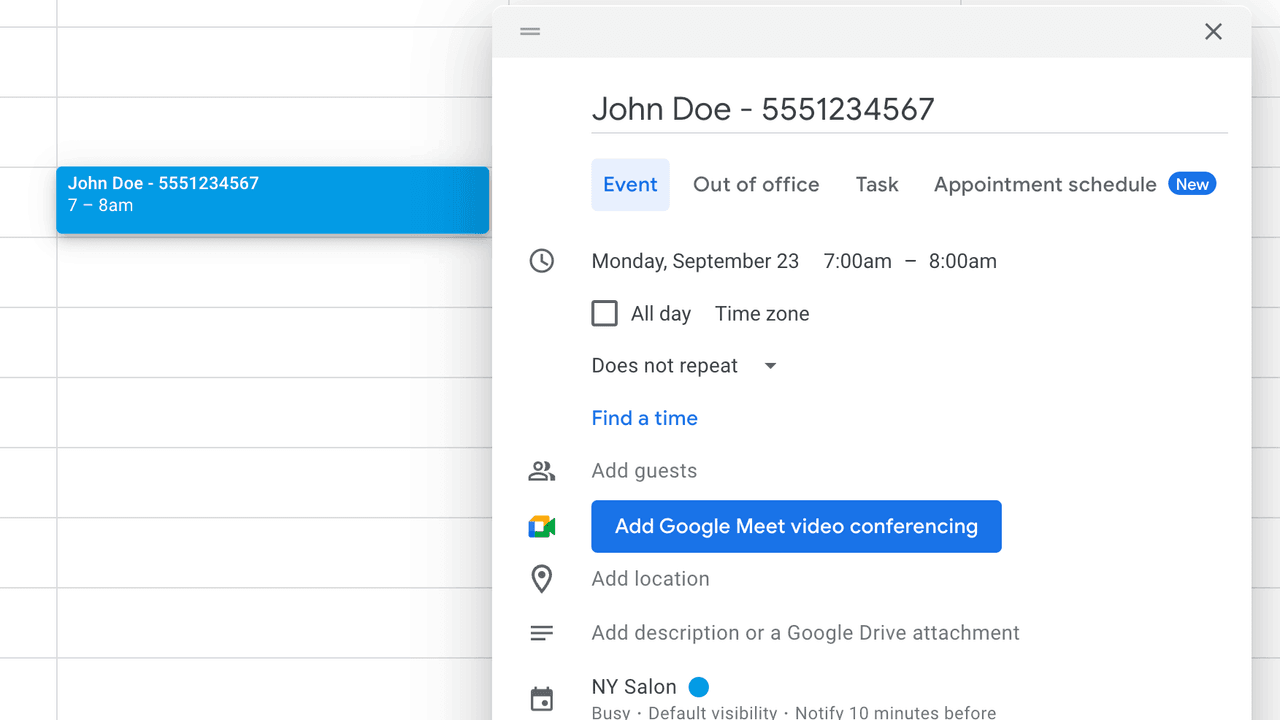
If the client is new, put the phone number directly into the Google Calendar event title. If the client already exists, Etisia can also work from the saved contact instead.

This is the fast path for one-off bookings and new clients.

Add a contact and use it forever in Google Calendar

Bonus

For returning clients, save the contact once and future Google Calendar events can be matched by name. That means less typing, cleaner event titles, and a setup that gets easier over time.

Once the contact exists, you can keep using Google Calendar naturally without re-entering the number every time.

Next step

How to replace Google Calendar SMS notifications

This walkthrough shows how a business owner connects Google Calendar and sends the first SMS reminder without changing the booking workflow.

Works with personal Gmail and Google Workspace accounts.

Preview of the 45-second Etisia setup video

FAQ

Are Google Calendar SMS reminders discontinued?
Yes. Google Calendar SMS reminders and SMS notifications were discontinued on January 7, 2019. Google Calendar still supports app, browser, desktop, and email notifications, but not native SMS reminders.
Can Google Calendar send SMS reminders?
No, not natively. Google Calendar can notify your own account, but it does not send SMS reminders to you or client-facing SMS reminders to the people on your appointments.
How do I send text reminders from Google Calendar?
Connect Google Calendar to Etisia, choose the calendars and reminder timing, make sure each event can be matched to a client phone number, and Etisia sends the text reminder automatically.
What replaced Google Calendar SMS notifications?
For personal reminders, Google replaced SMS notifications with app, browser, desktop, and email notifications. For client SMS reminders, you need a connected service such as Etisia.

Was this helpful?

A quick vote helps us improve this playbook.

Continue exploring

If you are evaluating Google Calendar SMS reminders, these are the most useful next pages to compare.